 APKBees
Alight Motion Video Editor
by Alight Creative Inc.
Loading...
Share App
Share Alight Motion Video Editor with friends
https://alight-motion.apkbees.com
SHARE ON
Alight Motion Video Editor for Mobile Creators in 2026
Mobile video editing has changed a lot over the past few years. People used to need a powerful PC, a paid license for professional editing software, and a fair amount of time just to learn an interface built for a mouse and keyboard rather than a touchscreen. Footage shot on a phone had to be transferred to a computer before any real editing could start, and that extra step added time to even simple projects. Entry level laptops often struggled to render anything beyond a basic cut, which left a lot of people stuck with limited options. That has changed. Mobile hardware has improved and editing software built specifically for phones can now handle work that used to require a full desktop setup. One of the editors we are going talk about in this shift is Alight Motion. This guide covers what the Alight Motion video editor actually offers, the features packed inside it, how to download the app on mobile phone, what separates the free version from premium, and a few tips to get started without feeling lost. Whether someone is a beginner experimenting with a first edit or a content creator after more creative control, understanding what this tool can do helps decide if it deserves a spot on the phone.
What Is Alight Motion Video Editor
Alight Motion is a mobile editing application developed by Alight Creative Inc, first released back in 2018. Since then it has grown into one of the most respected video editing tools available for Android, valued for bringing capabilities once limited to desktop software directly onto a phone screen. It does not just trim clips and add filters. It functions as a full motion graphics and animation tool, giving editors control over layers, keyframes, masking, and visual effects inside one workspace.
The latest release of the Alight Motion APK is version 5.0.273, with a file size of about 162.18 MB and full support for Android 15.0. That update brought faster rendering, additional transitions, refined visual effects, and improved color correction for more cinematic results.
Why This App Stands Out Among Mobile Editors
Most video editing apps on the Play Store only handle basic cutting, filters, and text overlays. The Alight Motion video editor does more than that. It puts video editing, animation, and motion graphics design into one tool instead of splitting those jobs across separate apps.
The difference shows up the moment someone tries to animate something more complex than a simple fade. A basic editor handles cuts and transitions fine, but it usually has no real keyframe system, no layer grouping, and no masking tools. The Alight Motion video editor app includes all three, along with a timeline built to handle multiple layers at once. That kind of toolset is normally found in desktop grade animation software, here built to run on a touchscreen.
Core Features Inside the App
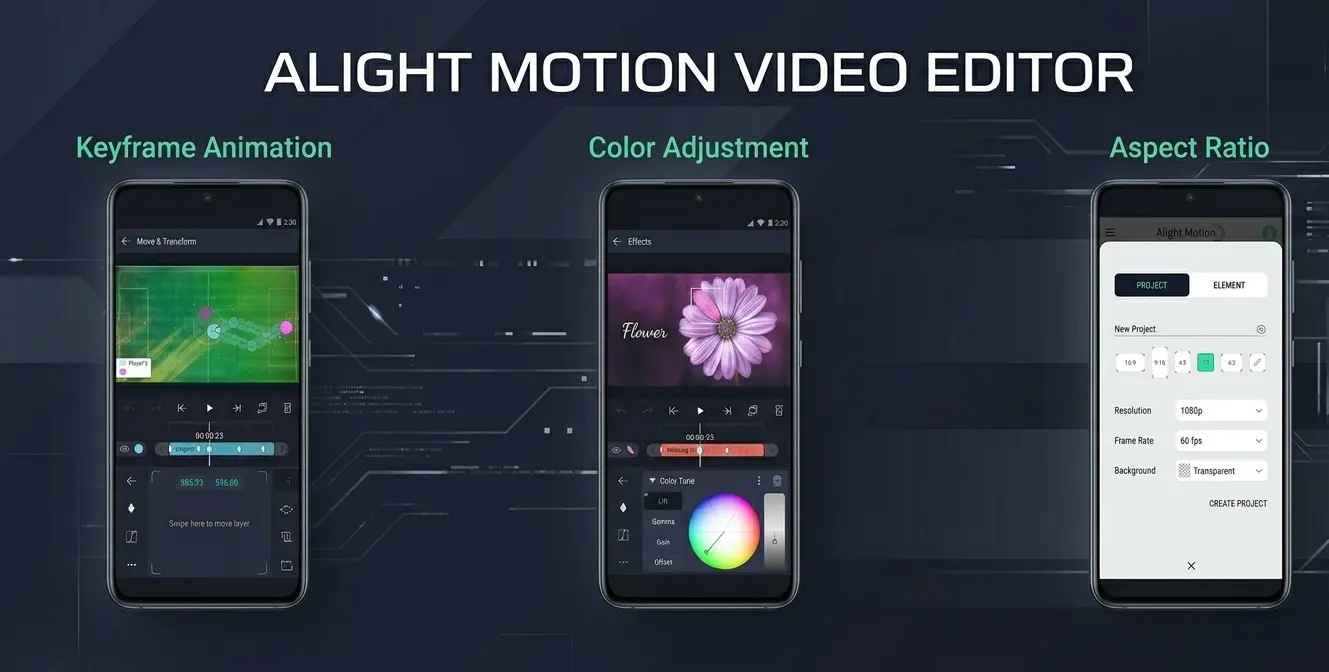
The editing canvas starts blank, putting every decision in the editor's hands, from frame size to resolution and background. From there, layers of video, images, text, shapes, and audio get stacked and animated on a functional timeline.
Keyframe Animation
Keyframes form the foundation of the entire app. Set a starting position and an ending position for any element, and the Alight Motion video editor fills in the motion between them. This is how creators animate text flying across a screen or make a logo pulse in sync with a beat. The keyframe and timeline system in the current version is noticeably smoother and easier to manage than in earlier releases.
Layered Editing
Multiple video tracks, graphics, and audio clips can sit on top of each other at once on the timeline. Objects can be grouped, linked as parent and child layers, and organized cleanly even in complex projects with dozens of elements.
Visual Effects
The app ships with more than 160 effect components, ranging from simple color adjustments to particle simulations, distortion effects, and 3D motion tracking. Shadow, highlight, exposure, and tone controls round out a library that few mobile apps can match.
Masking and Color Grading
Precise masking lets editors apply effects to specific areas of a frame rather than the whole image. Combined with detailed color tuning and gradient fills, the Alight Motion video editor offers the kind of cinematic control normally found in desktop grading software.
Audio Tools
Reverb, echo, equalization, and pitch shifting are all built into the audio engine, letting editors sync and refine sound directly inside the timeline instead of switching to a separate app.
Vector and Bitmap Support
Most mobile editors only handle standard video and image files. It also supports vector graphics, which makes it genuinely useful for designers working on illustrated content alongside footage.
Export Quality
Finished projects can be exported in HD or 4K, with noticeably faster processing in the latest version. Output formats include MP4, GIF, PNG, and still images depending on the project.
Here is a quick look at what's packed into the toolkit.
Keyframe animation with easing curves and timing presets
Object grouping with parent and child layer links
Motion blur based on velocity for realistic movement
Solid and gradient fills for shapes and backgrounds
Dynamic camera effects including pan, zoom, and focus blur
Green screen editing and freehand drawing tools
Custom font support with text animation
Particle simulations and 3D motion effects
Who Should Use the Alight Motion App
Alight Motion works well for many different types of creators who want professional results on a mobile device. Social media users rely on the app to make the quick, highly animated videos that perform best on platforms like TikTok and Reels. Graphic designers find the vector tools essential, as they allow for adding smooth motion to illustrations and custom artwork.
Freelancers and small creative studios often choose the app for professional projects when a computer or a full desktop setup is not available. It provides the flexibility to edit on the go without sacrificing quality. Even beginners find it very easy to start with one simple video layer and one text layer, then move on to much more complex, multi-layered projects as skills and comfort with the interface grow over time. The app is built to scale alongside the user, making it a reliable tool for both simple social clips and more advanced video productions.
Alight Motion vs CapCut
CapCut is the editor most people compare Alight Motion to. It is a free app built for fast, template driven edits aimed at platforms like TikTok and Instagram. Here is how the two actually compare.
Area | Alight Motion | CapCut |
|---|---|---|
Free export watermark | Added on every export | Only on Pro locked templates |
Core animation tools | Keyframes, masking, vector support | Keyframes, chroma key, templates |
AI assisted features | None, fully manual | Auto captions, AI voiceover, background removal |
Paid tier | Removes watermark, adds effects | Removes watermark, then unlocks 4K and AI tools |
Best fit | Custom motion graphics | Fast, template driven edits |
How to Download Alight Motion Video Editor
Getting started with Alight Motion is quick and simple. Follow the steps below to download and install the app safely on your device.
Download: Click the download button below to download the app directly from the Play Store.
Install: Once redirected to the Play Store page, tap the Install button.
Wait for Completion: Ensure to have a stable internet connection and at least 155 MB of free storage space available to complete the download.
Launch: Once the installation finishes, tap Open to launch the app.
Start Creating: You are all set! Open the app and start your first project right away.
By downloading directly from the official Play Store, the latest and most secure version of the app is ensured for the device.
Mastering Alight Motion Essential Tips
The Alight Motion interface can seem complex, but these basic tips help simplify the editing process.
Learn the Basics First: Before jumping into a complex edit, spend a few minutes with the app’s built-in tutorials. They are the fastest way to get comfortable with the core toolset without the pressure of a deadline.
Keep Initial Edits Simple: Don't overload first project. Try creating a composition with just one video clip and a single text layer. This is the best way to practice how the timeline works and how to set keyframes for smooth animations.
Build a Favorites Library: Stop wasting time digging through menus. Whenever you find an effect you love, bookmark it so it stays at your fingertips for every future project.
Prioritize High-Quality Output: Since Alight Motion supports up to 4K resolution, always aim to export final work at the highest settings hardware can comfortably handle to ensure the content looks crisp and professional.
By focusing on these habits, you will move past the initial learning phase much faster and start creating professional-grade edits with confidence.
Frequently Asked Questions
Is it free to download
Yes. The Alight Motion APK is free to download and use. A premium subscription adds extra features but the core editing tools cost nothing.
Does the free version include a watermark
Yes. Exported videos carry a watermark unless the premium subscription is active.
What Android version is required
The latest release is fully compatible with Android 10.0, with older versions of the Alight Motion app available for devices running earlier Android builds.
What file formats can be exported
Projects from the Alight Motion video editor can be exported as MP4, GIF, PNG, or still images, with HD and 4K options available.
Is it suitable for beginners
Yes. The interface takes some getting used to, but the built in tutorials and simple starting projects make the Alight Motion app manageable for new editors.
How large is the Alight Motion APK file
The current version is about 162.18 MB, so confirm available storage before downloading.
Can it handle multiple audio tracks
Yes. Multiple audio tracks can sit alongside video and graphic layers on the same timeline, giving full control over sound design.
This site is not affiliated with Alight Creative Inc. or the official Alight Motion app. All information provided here is for general informational purposes only. Always download the F APK from trusted and verified sources only.
Images
( Tap any image to open it )
Additional Info
Version
5.0.273.1028417
Size
155 MB
Category
Video
Requires Android
Android 10.0+
Info last Updated
25 June 2026
Price
Free
Developer
Alight Creative Inc.
Votes
5.0 / 5 ( 42 )